
Use Claude Code from your iPhone
What you need
- A machine that runs Claude Code and that you can reach over SSH: a Mac, a Linux box, a cloud VM. From outside your home network, a mesh VPN such as Tailscale is the usual way to reach it.
- tmux 3.2 or newer on that machine, so Sigmux can show windows and panes as native controls. From 3.3 each window keeps its own size.
- python3 on that machine for agent notifications. Sigmux's own push service also needs OpenSSL 1.1.1 or newer there.
- An iPhone or iPad on iOS 16 or later with Sigmux. It is free to try for 14 days; after that it is a one-time purchase.
Nothing else is installed for the terminal itself. The notification step below adds hooks to Claude Code's settings on the machine and shows you the files before it writes them.
Start Claude Code inside tmux
On the machine, start a tmux session and run Claude Code in it:
tmux new -s work
claude
tmux is what keeps the session alive when the phone locks, changes network or loses signal. Claude Code keeps working on the machine, and the phone attaches to the same session again when it comes back.
Connect from the phone
- In Sigmux, tap + on the Hosts screen and enter the machine's address, port and username.
- Sign in with a password or a key. Generate new key
makes an ed25519 key on the phone; copy its public half to the machine's
authorized_keys. - Under Connect to, pick tmux,
Control mode, and the session name,
work. - Tap the host and accept its host key. You are now looking at Claude Code, with a row of Ctrl, Esc, Tab and arrow keys above the keyboard.
More on each step is in Help › First connection.
Turn on notifications
- In Settings → Agents, turn notifications on and choose a service: Sigmux (a relay that forwards an envelope encrypted on your machine and cannot read it), or your own Bark, ntfy or Webhook endpoint.
- Under On your hosts, choose the machine. In its
Notifications tab select Claude Code and Agent
status, then install. Sigmux writes hooks into
~/.claude/settings.jsonand its own helper files. - Restart Claude Code in its tmux pane so it loads the hooks.
- Tap Send a test notification, then run a real turn. The test proves delivery; the turn proves the hooks fire.
For approval cards inside an open session, also turn on Quick replies in Settings → Agents.
Answer Claude Code from the phone
- From the notification. When Claude Code waits for an approval, the notification carries Allow, Always allow and Deny. You do not need to open the app.
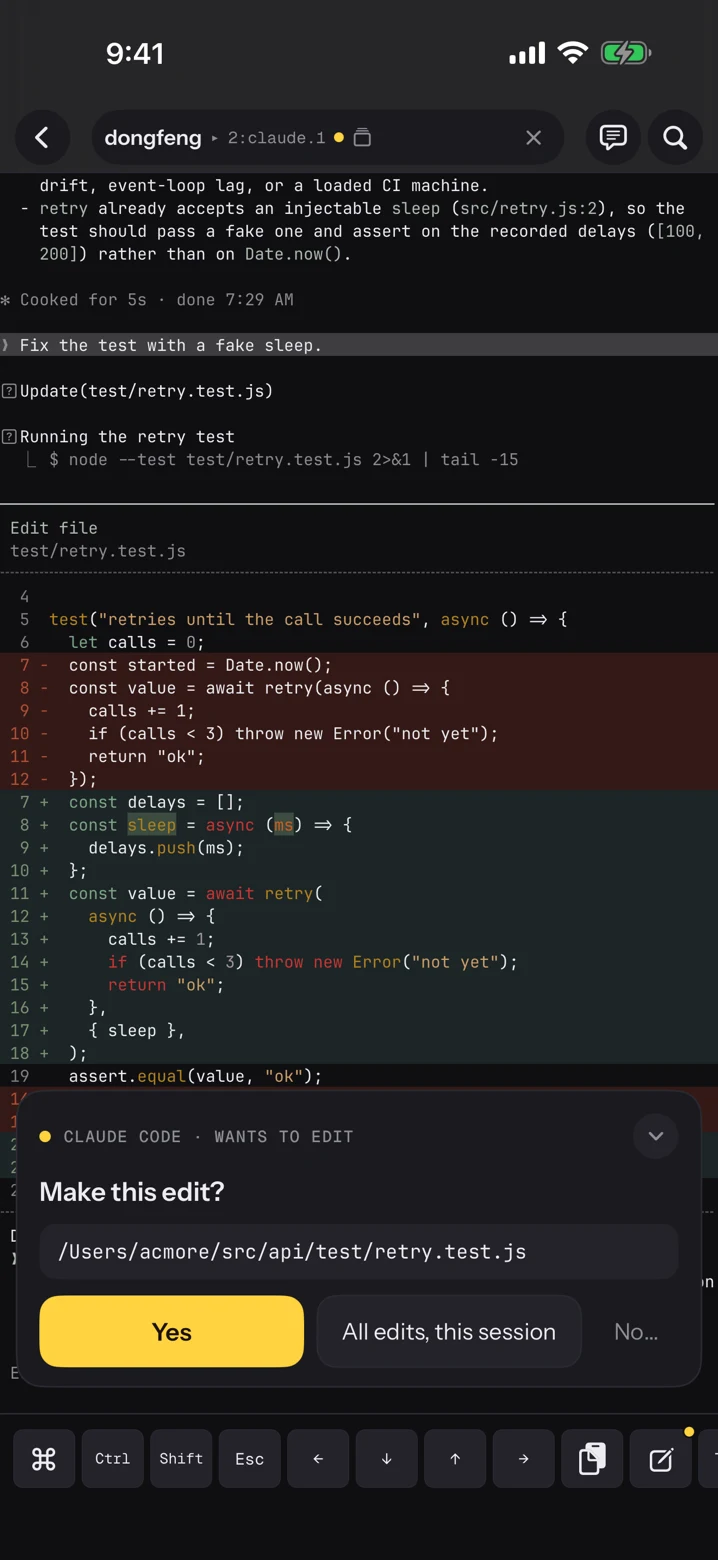
- In the session. A card above the keys shows what Claude Code wants to run or edit, with Yes, an Always choice when there is one, and No…. The terminal behind it shows the command or the diff.
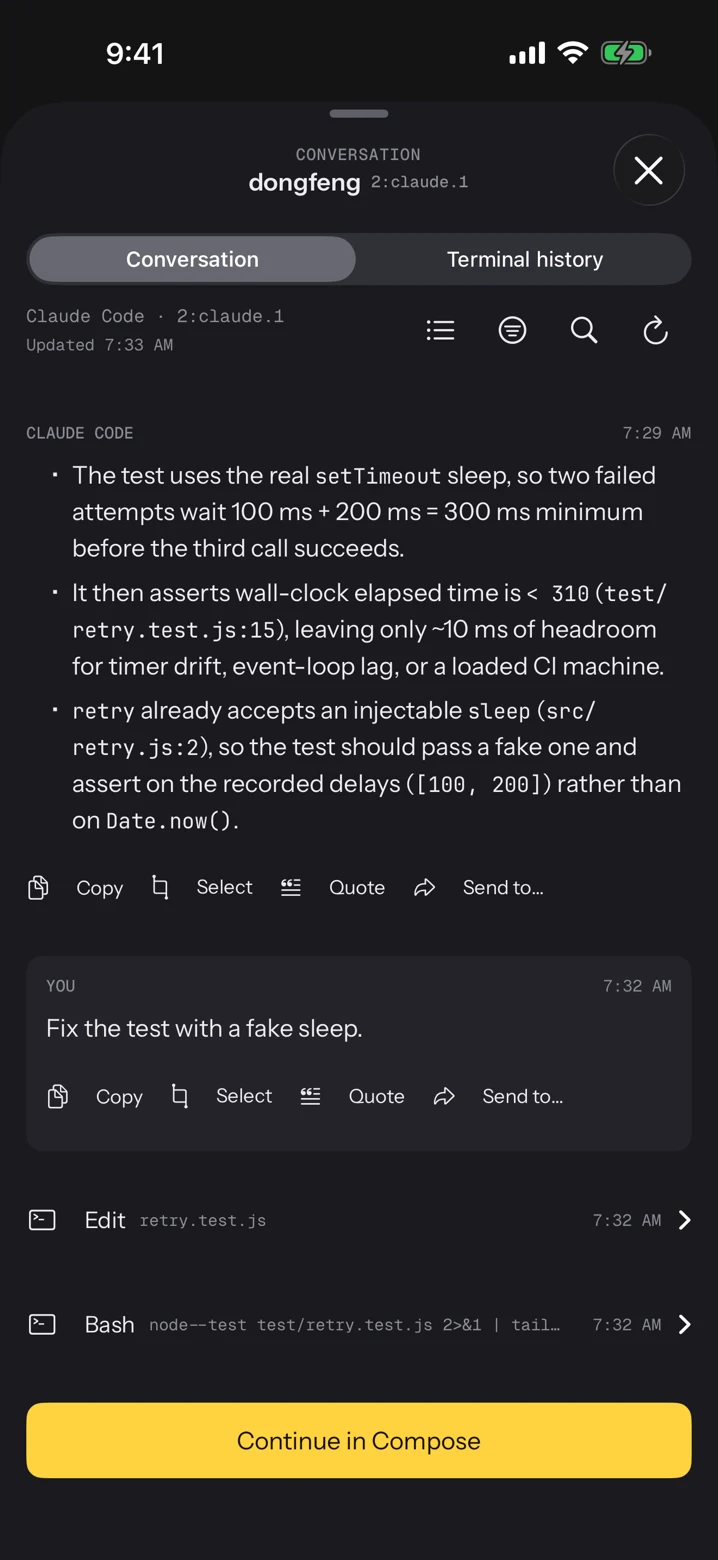
- Read before you answer. Reader shows the conversation as text you can scroll, copy and quote, instead of terminal scrollback. A file Claude Code mentions opens in a reader; the git changes it made open as a diff.
- Write a real reply. Compose is a text field with autocorrect and dictation. It takes photos and files too, uploads them to the machine, and sends the lot to Claude Code as one paste.
What stays on your machines
Sigmux has no account and no analytics. Terminal traffic goes from the phone to your machine over SSH and nowhere else. An approval you give on the phone travels over that same SSH connection. The only service in between is the optional notification relay, which passes on a message your machine encrypted for your phone and cannot read it. Details are in the privacy policy.
Codex and OpenCode
Both work the same way: run them in tmux, install their notifications from Settings → Agents, restart them. Codex asks you to review new hooks before it uses them. The per-agent steps are in Help › Recommended agent setup.
If something is off
- Connecting takes seconds or typing lags on cellular: a relayed Tailscale path is the usual cause.
- "tmux handshake timed out": Help › Troubleshooting.
- Notifications stopped: Help › Troubleshooting.
- Anything else: open an issue or write to sigmux@acmore.dev.